Console And Visualization
The Astraeus Console is the packaged local interface for configuring and launching single runs, following their execution, and exploring completed artifacts in synchronized spatial and engineering views.
Launch it with:
astraeus console
The command starts the local Console service, opens a browser, and serves the
web application and API together. By default it binds to 127.0.0.1:8765 and
uses .astraeus_console/ as its editable workspace.
Where The Console Fits
Use the Console for the normal single-run loop:
The Console and RunSpec are two views of the same configuration. Structured controls cover common constellation, ground, attitude, power, service, transport, and shared link-profile inputs. The integrated RunSpec editor covers the complete single-run input when a field is outside that guided surface.
When explicitly enabled, the optional Console Agent can explain the loaded evidence and prepare approval-gated RunSpec proposals. It is not required for configuration, execution, or analysis.
Sweeps, batches, and campaigns keep their dedicated CLI workflows. Their child core-run bundles can still be opened in the Console when they contain supported artifact families.
Configure And Launch
Start from a curated example, open a YAML or JSON RunSpec, or edit the current configuration. The Simulation Configuration workspace keeps the guided controls beside the generated RunSpec, with a full syntax-highlighted editor available from Edit.
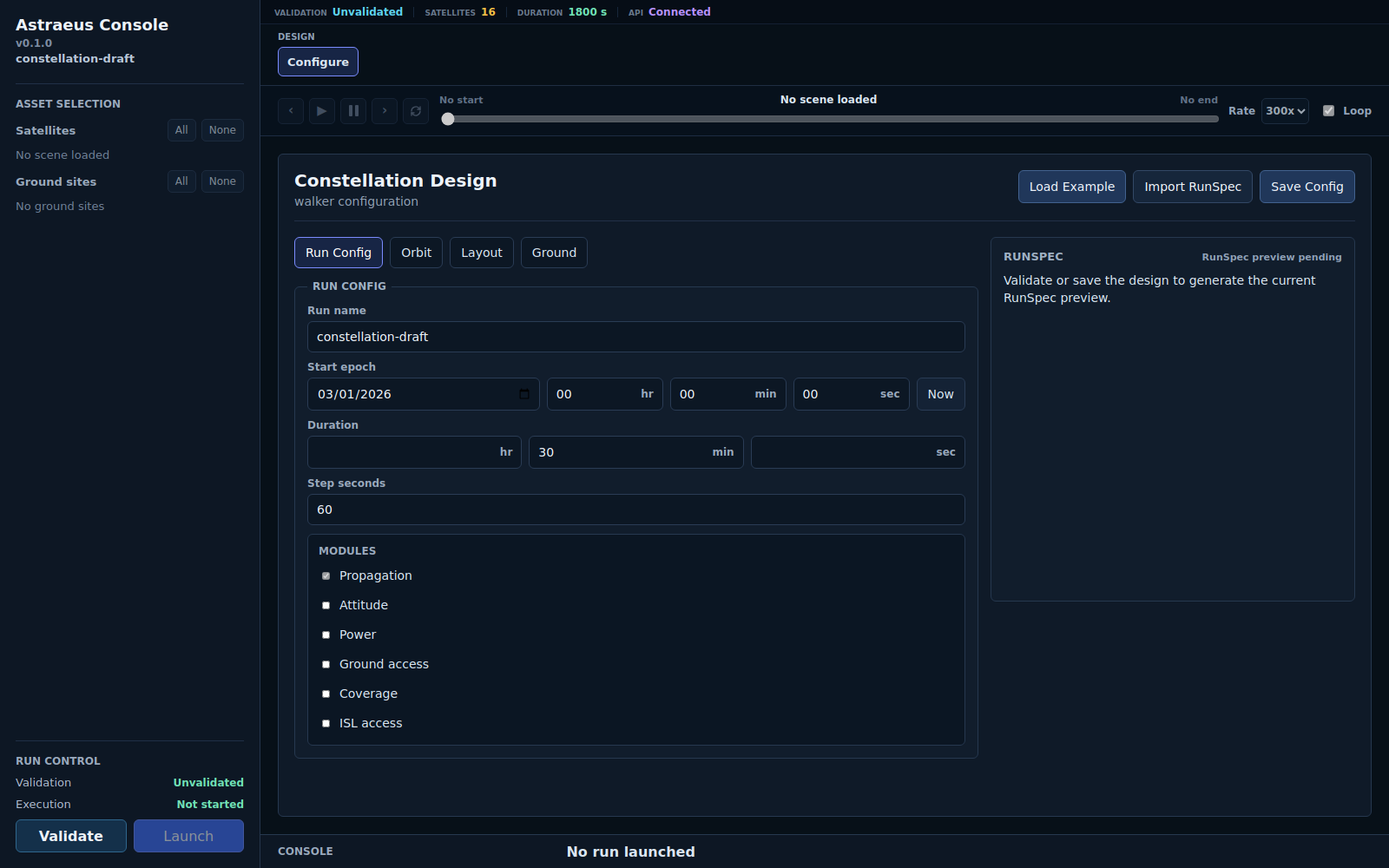
Configuration, RunSpec preview, validation, and launch stay in one local workspace. A successful launch loads the available result panes automatically.
| Need | Console path |
|---|---|
| Change common orbit, layout, ground, attitude, power, service, or transport inputs | Use the structured configuration tabs |
| Reuse communications assumptions | Use the shared Link Profiles tab |
| Change any supported single-run field | Open Edit in the RunSpec pane |
| Keep an editable Console copy | Rename the RunSpec and select Save |
| Write a RunSpec to the local machine | Select Download |
| Check an input without executing it | Select Validate |
| Use the normal execution path | Select Validate + Run |
Validation errors and warnings appear in the Console tray. A valid design can still contain warnings that deserve review before execution.
For a deliberate authoring sequence, see Authoring RunSpecs. For exact input fields, use the RunSpec reference.
Follow A Running Simulation
The run drawer opens while a Console-launched simulation is active. It shows the execution phase, elapsed time, stage progress, and process output. When the run finishes and its results load, the drawer collapses so the analysis workspace is available again. It can be reopened when the execution record is still useful.
The Console restores durable terminal results after a restart when it can match a Console job to one complete run artifact. Check the run drawer and host process state before rerunning interrupted work: restart recovery records the artifact state and does not take control of a calculation still running outside the restarted Console process.
For core, sweep, or batch progress outside the Console, use the Run Monitor.
Open A Completed Run
Select Open existing run to browse completed run bundles. The dialog can search the current location, descend through its folders, and open a selected run read-only. A local installation can add or remove run locations through the folder browser; deployments with managed roots expose only the locations the operator configured.
You can also expose an initial location when launching the Console:
astraeus console --runs-root runs
Repeat --runs-root to expose another location.
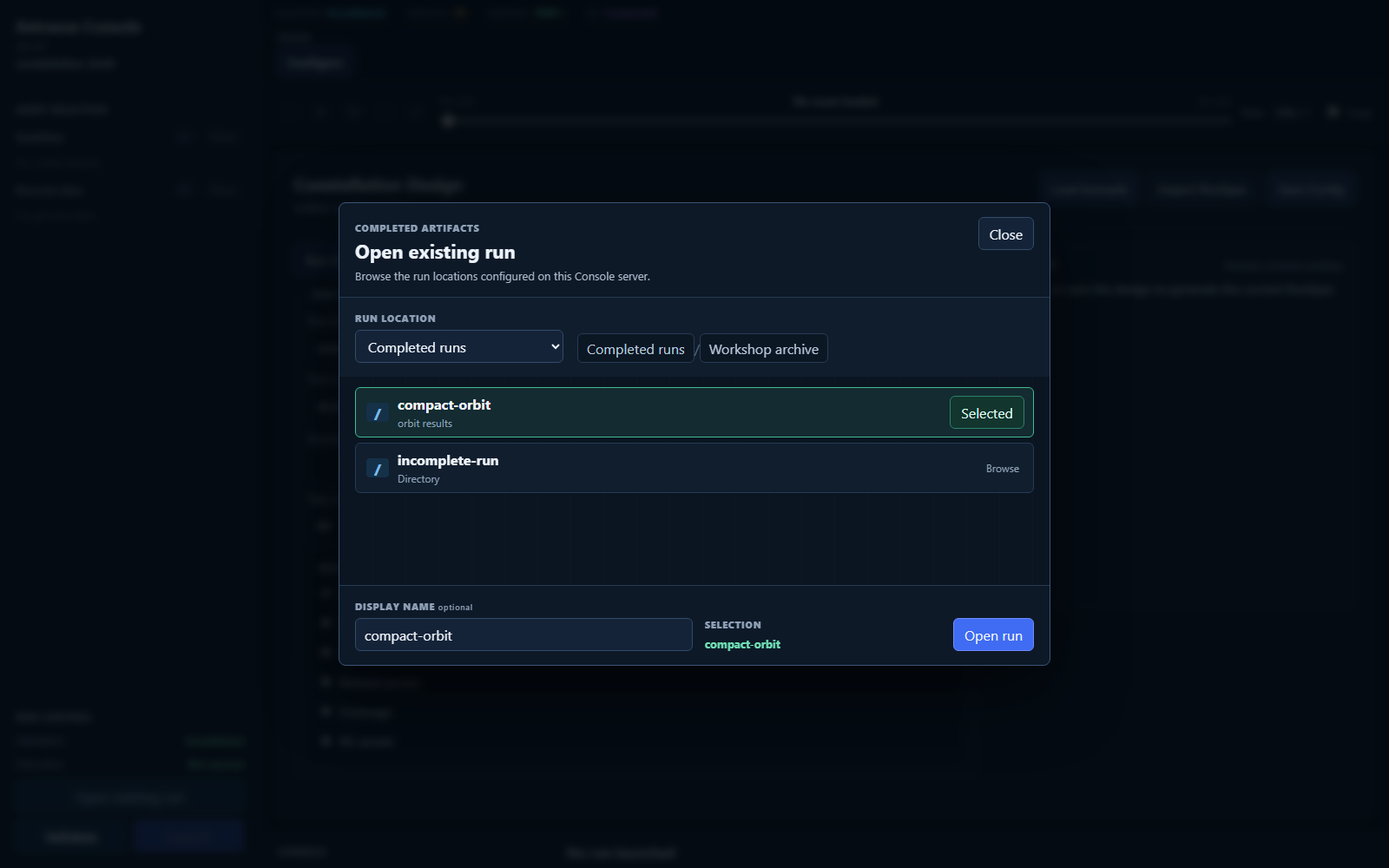
Opening a completed run leaves its artifact bundle in place and loads only the views supported by the available artifact families.
The run needs a current completed-run contract and at least one supported result family. Pane buttons appear when the corresponding artifacts are present. Compatibility of saved runs across supplied releases follows Compatibility And Upgrades.
Link Directly To Registered Results
Every completed run registered with the Console has a local, durable link. The base form opens the run in its preferred available workspace:
http://127.0.0.1:8765/runs/<job-id>
Workspace links add one of the visible workspace names, such as
/runs/<job-id>/map2d, /runs/<job-id>/coverage, or
/runs/<job-id>/transport. Changing panes updates the browser address, so the
current view can be bookmarked or copied. Back and forward navigation restore
the addressed run and pane, and refreshing the page reopens the same result.
The URL contains only the Console's opaque job identifier and optional workspace. It does not contain the result folder, RunSpec content, or a credential. The link is local to that Console workspace: the job registration must still exist, its completed artifacts must remain available, and imported artifacts must remain inside a trusted result location. When any of those conditions no longer holds, the Console shows a recovery message instead of displaying another run.
Export Loaded Results
When completed results are loaded, select Export beside their name. The Console inventories the preserved bundle and shows its file count and source size. Edit the proposed filename if needed, then select Save bundle to write a ZIP through the browser's native save dialog. Browsers without that filesystem capability use their normal download behavior. Select Browse files beside Export to navigate directly to the preserved source folder instead.
The ZIP contains the complete run directory without changing it. It also adds
.astraeus-console-export/export_manifest.json with the export time, Console
job identity, source kind, and file inventory summary. Console-launched runs
include their owned execution log under the same metadata directory; imported
runs have no Console-owned execution log to add.
Console-launched runs are already durable beneath
.astraeus_console/runs/<job_id>/artifacts/ unless --workspace-root selects a
different workspace. Imported runs stay in the trusted external folder from
which they were opened. Export provides a portable copy in both cases; it does
not move, rewrite, or delete the source.
For safety, an imported source must still be inside a currently trusted result folder. The file-explorer action uses that same boundary and cannot be directed to an arbitrary path. Symbolic links and other non-regular paths are rejected rather than followed into the archive.
Shared Selection And Timeline
Scene-backed views share the selected satellites, ground sites, and timeline position. Play, pause, step, scrub, playback-rate, and loop controls keep the spatial and engineering views aligned at the same simulation time.
The 2D and 3D orbit views interpolate spacecraft motion between stored states for smooth playback. Ground tracks are densified from the propagated trajectory. Engineering events, windows, metrics, and histories retain the cadence and resolution of their saved artifacts.
Geometry Views
3D
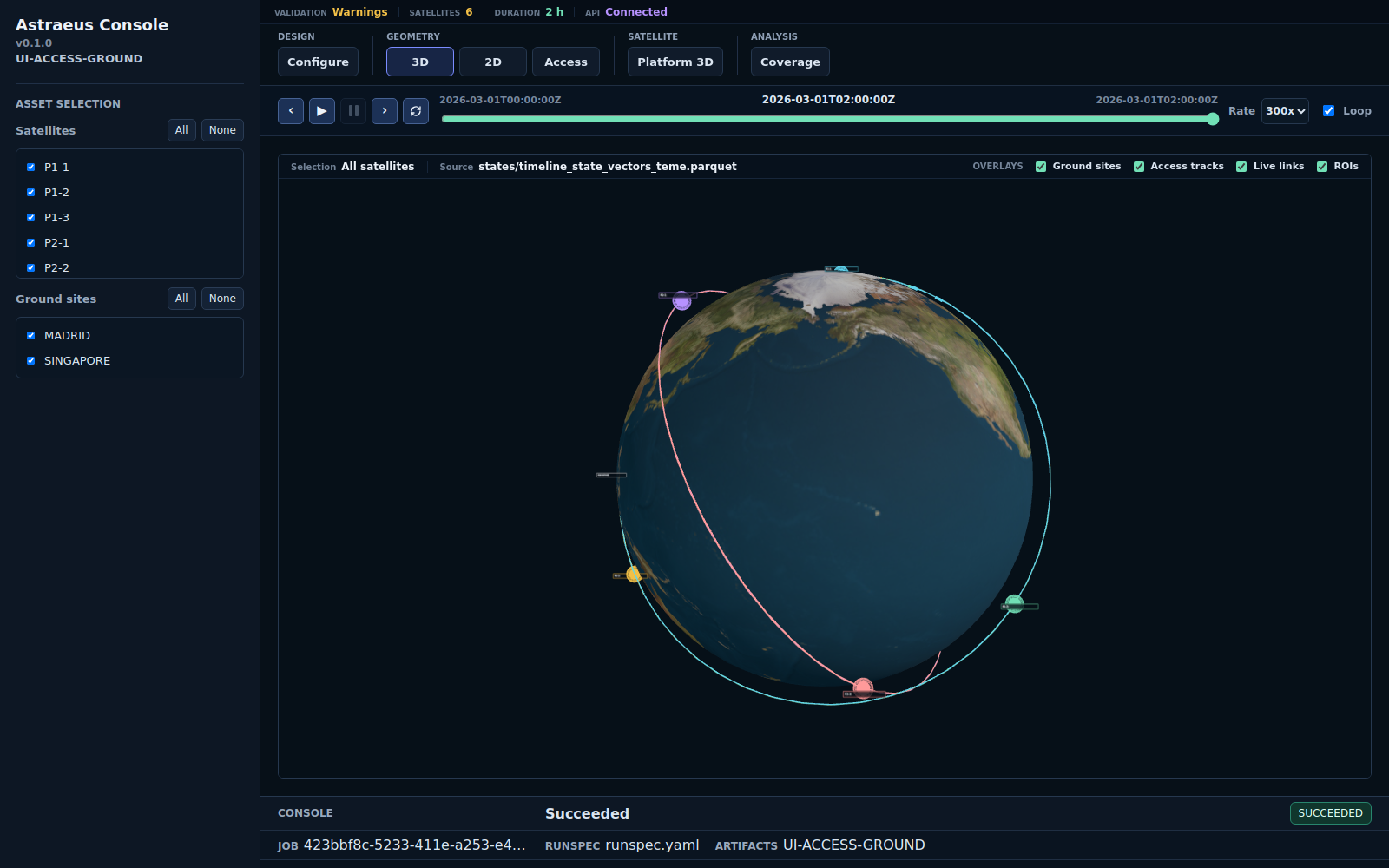
The 3D view combines Earth, orbit trajectories, spacecraft, ground sites,
active ground and ISL links, attitude/platform geometry, payload and feeder
beams, and propulsion segments when the corresponding artifacts exist. Display
controls select overlays and beam presentation without changing the run.
Individual beams renders each configured payload beam, while Beam envelope
shows one outer volume containing that configured beam set. Live links show
access eligibility at the selected simulation time, not scheduled traffic or
delivery.
2D
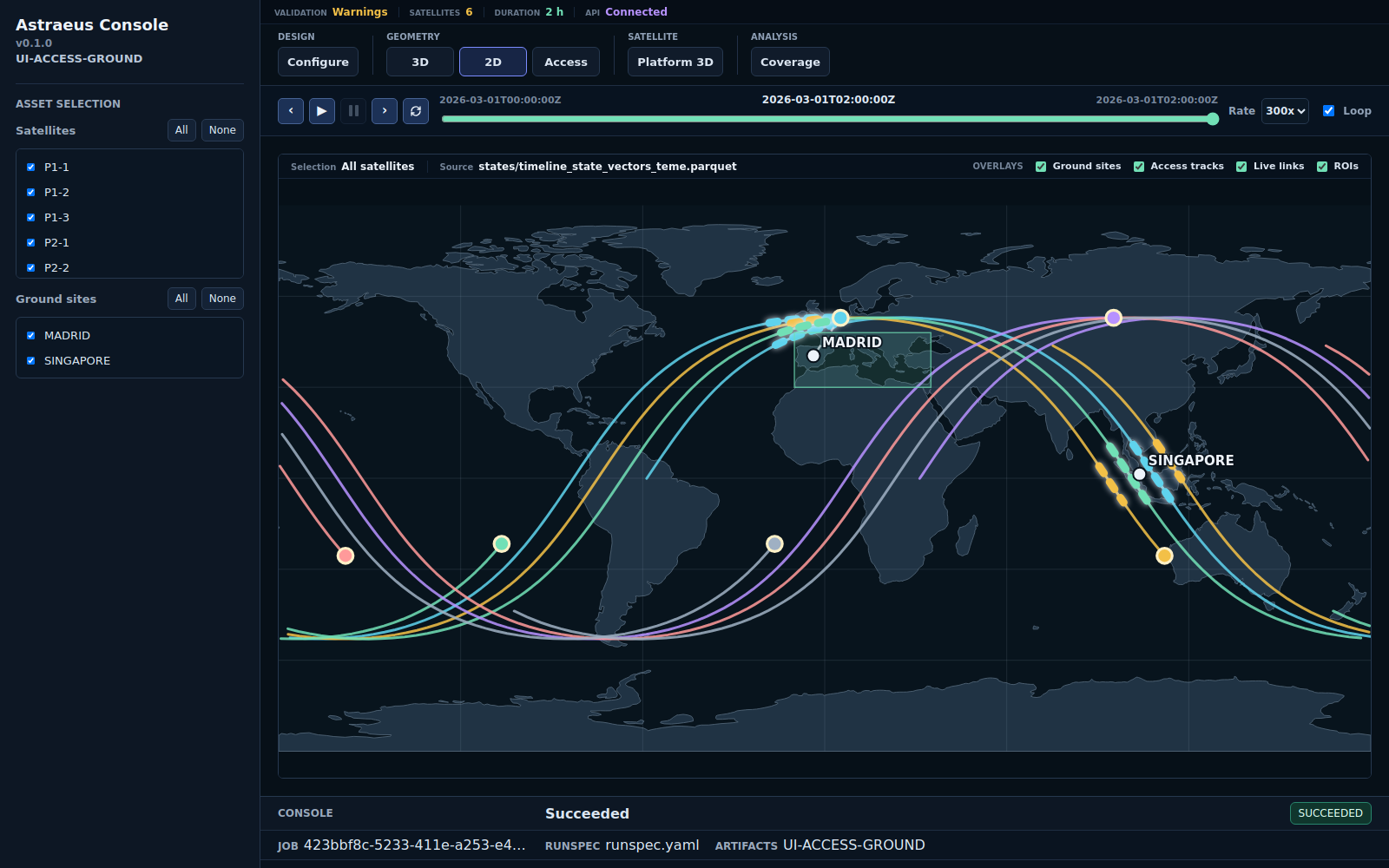
The 2D map shows ground tracks, current spacecraft positions, ground sites, regions, active access links, coverage context, and propulsion segments over a geographic basemap. The Trajectories control therefore shows orbital paths in 3D and their Earth-fixed ground tracks in 2D.
Access
The Access pane brings ground-access and ISL opportunity evidence together. Use it to inspect which endpoint pairs were geometrically available, when their windows occurred, and how the selected assets relate to the current time.
Geometry and access definitions are detailed in Orbits, Access, And Coverage.
Platform Views
Attitude
The Attitude pane compares pointing modes, commanded and realized orientation, slew and settling behavior, and pointing availability. The 3D spacecraft view uses the same selected time as the other panes.
See Attitude.
Power
The Power pane presents generation, load, net power, state of charge, margins, violations, fleet distributions, and sizing variants from the saved power artifacts.
See Power.
Propulsion
The Propulsion pane connects maneuver events, target progress, delta-v, propellant, mass, and orbital response. Burn intervals are also shown on the 2D and 3D geometry views.
See Propulsion.
Result Views
Coverage
Coverage combines spatial results, area and point weighting, revisit and gap statistics, fold selection, and point-level inspection. The selected metric and region determine how the map and distributions should be interpreted.
See Geographic Coverage.
Observation
Observation follows the mission funnel from opportunities through captures and products to delivery, with target-level revisit, rejection, and timeliness evidence.
See Observation Missions and Observation result terms.
Service
Service relates demand geography and opportunity to served outcomes. Its maps, distributions, and timelines distinguish where demand was offered, admitted, served, and delivered.
See Service Missions and Service and transport result terms.
Transport
Transport follows the communications chain through link closure, admission, scheduling, routing, beams, gateways, delivery, latency, and backlog. Its subviews expose the network, spatial, activity, operations, and beam evidence that exists in the run bundle.
See Communications gates, Transport path modes, and Transport results.
Console, Monitor, Review, Or Report?
| Need | Use |
|---|---|
| configure, run, or visually inspect one local simulation | astraeus console |
| watch active core, sweep, or batch progress | astraeus monitor serve |
| produce a compact deterministic markdown assessment | astraeus review |
| produce a decision-level scenario report and curated plot pack | astraeus report scenario |
| execute a sweep, batch, or campaign | its dedicated CLI workflow |
The Console reads completed run artifacts without modifying them. Review and report commands create derivative files while leaving the underlying bundle unchanged.
Launch Options
astraeus console \
  --host 127.0.0.1 \
  --port 8765 \
  --workspace-root .astraeus_console \
  --runs-root runs
Use --no-browser when opening the URL yourself. The Console is a local
single-user tool; choose a bind address and run locations appropriate for the
data being reviewed.
For the durable result structure behind every view, see Understanding Outputs.